
School bells that ring on time, every day, by themselves.
Set your timetable once on your phone. Periods, assembly, lunch and dismissal ring automatically — even when there is no internet.
- Works without internet
- No login needed
- Holidays skip automatically
- Made in India
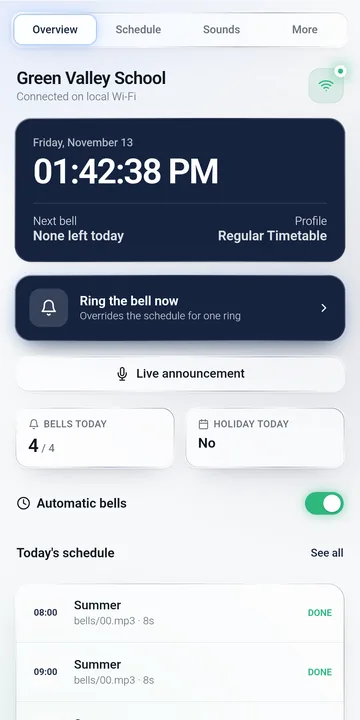
No one has to run to the bell any more
Your staff look after children, not the clock. The bell keeps the whole school on time, from the first prayer to the last period.
Every period on time
Assembly, periods, short break, lunch and dismissal ring exactly when your timetable says.
Exam days and half days
Keep a separate timetable for exams, Saturdays or winter timing, and switch with one tap or automatically by date.
Silent on holidays
Add holidays once. The bell stays quiet on those days. Events like sports day are only marked on the calendar.
Announce from your phone
Hold to talk and your voice plays through the school speakers. No need to walk to the office microphone.
No internet needed
The bell has its own Wi-Fi and its own clock. Internet or not, it rings on time.
Pleasant sounds included
Electric bell, chimes, gong, beeps for exams and a drill siren. Add your own prayer or anthem recordings too.
Power cuts? No problem
The built-in clock keeps time. When power comes back, the timetable carries on correctly.
Looks after itself
A quiet restart at night keeps it fresh for years, and new features arrive through app updates — no technician visit.
Set it once. It runs the day.
An example timetable. Yours can have as many bells as your school needs, each with its own sound.
Simple enough for any staff member
Swipe to see the screens your office will use.
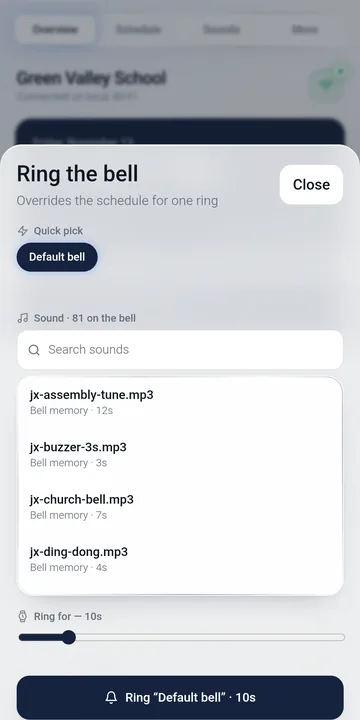
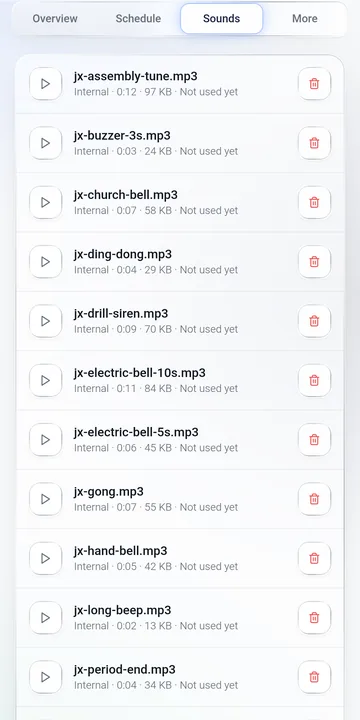
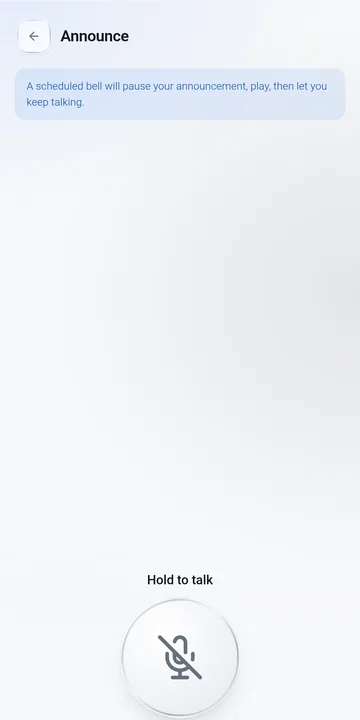
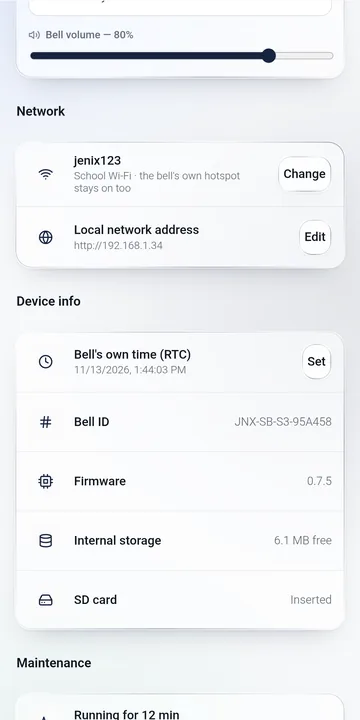
Ready in about 10 minutes
Install the free app
Get "Jenix School Bell" from Google Play on the office phone. No account or login.
Connect to the bell
Join the bell's own Wi-Fi from the phone and tap Find bell. The app asks you to set your own password.
Enter your timetable
Add each bell with its time, days and sound. Add your holidays. That's it — the bell takes over.
Made for the people who run the school day
Frequently asked questions
Does the school bell need internet?
No. The bell keeps its own clock and timetable and rings by itself. Your phone connects to the bell's own Wi-Fi to make changes. School Wi-Fi is optional.
What happens during a power cut?
The bell's built-in clock keeps the correct time. When power returns, it continues with the right timetable. Your timetable, holidays and sounds are stored inside the bell.
Can we have a different timetable for exam days or Saturdays?
Yes. Keep several timetables — for example Regular, Exam and Half day — choose the days of the week for each bell, and let the bell switch timetables automatically for date ranges such as exam week.
Will the bell ring on holidays?
No. Add holidays and school-closed days in the app and automatic bells stay silent on those dates. Events such as sports day are only marked on the calendar. You can still ring the bell by hand any day.
Can a teacher make an announcement?
Yes. Press and hold "Hold to talk" in the app and speak; your voice plays through the bell's speakers. If a scheduled bell is due, it plays and then your announcement continues.
Can we use our own prayer, national anthem or bell sound?
Yes. The app includes ready-made bell tones, chimes and a drill siren, and you can add your school's own MP3 recordings from the phone. An SD card is optional — the bell has its own memory for bell sounds.
Can we ring the bell by hand?
Yes, from the app with "Ring the bell now", or with the button on the bell itself.
Do we need an account or login?
No. Install the free Android app, connect to the bell's Wi-Fi and start. Nothing is uploaded to a server.
How do we get it for our school?
Call or WhatsApp +91 72402 26566 or email jenixindia@gmail.com for price, installation and a demonstration.
Want this for your school?
Ask for price, installation and a free demonstration.
or email jenixindia@gmail.com
स्वचालित स्कूल बेल — टाइमटेबल एक बार फ़ोन से सेट करें, घंटी हर पीरियड पर अपने आप बजेगी। इंटरनेट की ज़रूरत नहीं।